Nightcore & Sped Up / Guide
How to Make Nightcore and Sped Up Songs in Your Browser
To make nightcore, increase a track's playback speed so the tempo and pitch rise together, preview the vocal, and export the result. In the free Karps browser tool, start at 1.25× with reverb off, then compare a gentler 1.15× and a more exaggerated 1.35× before choosing.
Make a nightcore edit free — no sign-up. Use your own recording or a track you have permission to edit and publish.
Start with the right kind of sped up sound
“Sped up” describes the faster result, but it does not tell you whether the singer's pitch changes. This tutorial's browser workflow produces the raised-pitch version associated with nightcore. It is not a pitch-preserving time-stretch tool.
That distinction matters before you move a slider. If you want a brighter, higher voice as part of the effect, coupled speed and pitch are useful. If the original vocal identity matters more than the higher tone, you need a different process. Audacity's documentation makes the same technical distinction between changing speed and pitch together and changing tempo independently.1011
For the longer comparison, read nightcore versus sped up. Neither treatment is automatically better: choose according to the track and the edit you are making, not the name that seems more popular.
Make nightcore in your browser, step by step
- Step 1
Choose a local audio file
Open the sped up tool and choose a track you own or have permission to edit.
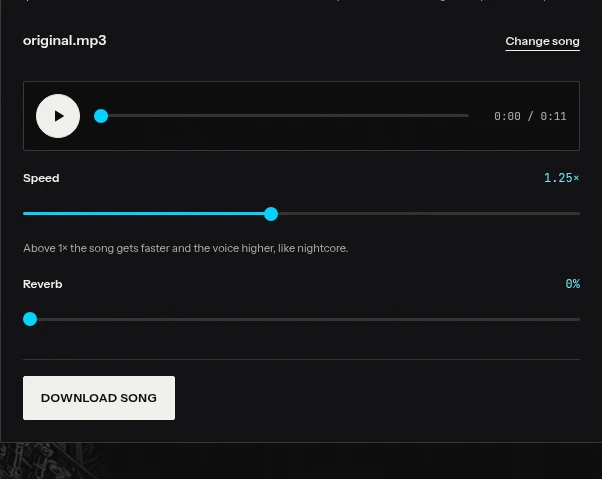
1. Choose the cleanest source you have
Open the sped up tool and select a local audio file. The quick tool processes audio in your browser; it does not ask you to create an account for this workflow. Its source limits are five minutes and 80 MB. Browser decoding support also matters, so an unsupported file may need conversion before you can use it.
Prefer the original file over audio captured from a video or downloaded from a messaging app. Speed changes will not repair pre-existing crackles, a clipped vocal, or a low-quality encode. Keep the unedited source separately so you can return to it instead of repeatedly processing exports.
2. Turn reverb down before choosing speed
The tool starts at 1.25× with reverb off. Keep it that way for your first comparison. Listen to a phrase with clear consonants, a kick-and-bass section, and a busy chorus. A setting that flatters a long vowel can still make rapid lyrics difficult to follow.
Move down to 1.15× and back up to 1.25×. Then try 1.35×. Judge the movement and the voice separately: “the drums feel exciting” and “the singer now sounds too thin” can both be true.
3. Add space only after the voice works
If the dry version is convincing, add a little reverb. The browser tool uses synthetic reverb, not the Studio's real-space impulse responses. Treat the control as an amount of effect, not a measurement of room size or an exact percentage of the final sound.
Stop when words begin running into the next phrase or the kick loses its outline. You do not need reverb for an edit to count as nightcore.
4. Export and listen to the actual file
Choose MP3 download, let rendering finish, and play the saved file outside the tool. Check both the beginning and the end, including any reverb tail. Listen on headphones, then on a phone speaker at a sensible level.
Name the export with its settings, such as my-track-nightcore-125-dry.mp3. That small habit prevents confusing a near-final file with the version you intended to post. MP3 download is part of this free workflow; it is not a promise of free WAV export.
Compare 1.15×, 1.25× and 1.35×
These are useful audition points, not official genre boundaries. The right setting is the one that makes the whole arrangement work.
| Speed | A useful starting impression | What to check |
|---|---|---|
| 1.15× | A lighter, less dramatic lift | Does the edit feel different enough? |
| 1.25× | A clear raised-pitch nightcore effect | Are the main lyrics still easy to follow? |
| 1.35× | A deliberately exaggerated treatment | Do hats, consonants or synths become tiring? |
Use the same musical phrase for each comparison. Do not choose a favorite from three different sections: the arrangement itself could be driving the decision. Return to the original after each version so you can hear how far you have moved.
A dense, already-fast track may need a smaller change than a sparse ballad. A higher vocal can be the point of one edit and the reason another fails. These are aesthetic judgments, not evidence that a particular speed works best for a whole genre.
Keep the voice closer to its original pitch
If every raised-pitch setting makes the singer sound wrong to you, stop looking for a hidden “natural voice” switch in the quick tool. It changes pitch with playback speed by design.
The Studio has a separate pitch-preserving Sped Up effect. That effect requires Premium or Pro; creating a free account does not unlock every effect. Studio Slowed is available on Free, but that is a different effect and should not be confused with natural-pitch speeding up.
Listen to the relevant examples on the demo page before deciding which process you need. Pitch preservation also does not promise a perfectly unchanged performance: a faster phrase has different timing, and time-stretching can introduce artifacts. Audacity documents that larger time-stretch changes can be less convincing.11
Choose the process first, then fine-tune the result. Trying to undo a strongly raised voice by repeatedly exporting and applying another tool adds work and can degrade the source.
Combine sped up audio with reverb carefully
Reverb can soften the edges of a quick edit, but it can also hide the very rhythm that made speeding up attractive. Start with the dry version as your reference. Add enough space to hear a tail after a word, then check whether the next word still starts cleanly.
Use a break in the arrangement as a second test. If the reverb fills a pause you wanted to keep, reduce the amount. If the bass becomes a continuous blur, do not compensate by simply turning up the overall volume.
In the Studio, real-space Reverb requires Premium or Pro, as does natural-pitch Sped Up. The free browser tool already lets you experiment with a simpler synthetic reverb without signing up. Those are distinct workflows with different controls and access, not identical versions of one preset.
The Audacity route
If you prefer a desktop editor, Audacity provides an alternative:
- Import your source and select the audio you want to change.
- Open Effect → Pitch and Tempo → Change Speed and Pitch.
- Enter a speed multiplier such as 1.25, preview the selection, and apply it.
- Listen to the full edit, add any wanted effects, and export a new file.
Audacity's manual confirms that this effect changes tempo, pitch and frequency content together. For faster audio without the linked pitch change, use Change Tempo instead.1011 Menu organization can differ between versions; look for the effect name rather than a tutorial screenshot from an older release.
Whichever route you use, save an editable project separately from your export. An exported MP3 is not a substitute for the source and the decisions that produced it.
Fix common problems before you publish
The voice is hard to understand. Reduce speed before adding EQ or louder playback. Check the fastest line, not just the hook.
The edit is bright but feels weak. Compare with the original at a similar listening level. Do not assume more bass or more limiting will restore the original balance.
It sounds loud in the editor but small on a phone. Check the actual export and read our YouTube and Spotify loudness guide. Loudness matching and tonal balance are separate from tempo.
You want to upload someone else's song. A successful export is not clearance. YouTube specifically lists songs changed only in pitch or speed among examples that are not eligible for monetization under its channel policies.1 Obtain appropriate rights and treat monetization as a separate question.
Start simple: one source, one speed decision, then an optional amount of reverb. Try the nightcore maker, compare the three speeds, and keep the version that still makes you want to hear the next chorus.
Sources
Sources checked October 27, 2026.
Frequently asked questions
What speed should I use for nightcore?
Try 1.15× for a smaller change, 1.25× for a more obvious effect and 1.35× for an exaggerated version. These are listening suggestions, not a required nightcore standard.
Can I speed up a song without changing the voice?
The free browser tool raises pitch with speed. Natural-pitch Sped Up is a separate Studio effect requiring Premium or Pro.
Is the free nightcore download a WAV?
The free browser workflow includes MP3 download. Do not confuse it with the Studio's paid WAV export.
Does making nightcore give me permission to upload a song?
No. Changing speed or pitch does not grant rights to the original recording or composition. Clear your intended use before publishing.