8D Audio / Guide
How to Make 8D Audio Online: Spin, Reverb and Export
To make 8D audio in your browser, choose a supported audio file, set the spin cycle and reverb, then preview it through both sides of your headphones. In Karps Music, start with the default ten-second cycle and 25% reverb, then export a stereo MP3. The effect moves the whole mix left and right; it is not an Atmos conversion or a way to separate instruments.
Step by step in the browser
Open the 8D audio maker. The quick version runs locally in your browser without an account. Its current input limits are five minutes and 80 MB; MP3, M4A, WAV and FLAC are the formats suggested by the interface, subject to your browser being able to decode the file.
- Step 1
Choose file
Open a supported file you own or have permission to edit, within the five-minute and 80 MB input limits.
- Step 2
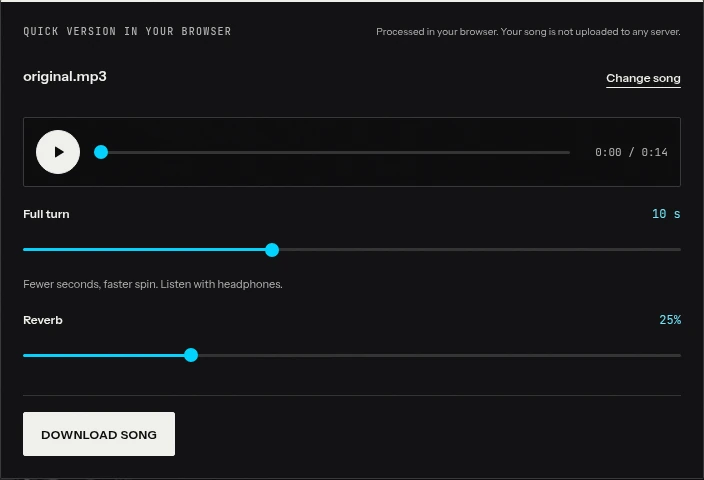
Set spin
Start at a ten-second cycle. Increase the seconds value for slower movement.
- Step 3
Set reverb
Start at 25%, then compare with less if the vocal becomes unclear.
- Step 4
Listen and download
Preview with both headphones, choose Download song and export MP3. Check that later video exports remain stereo.
Choose the right source
Use an original or licensed file rather than a screen recording of another edit. Keep an untouched copy. If the track already has dramatic stereo movement, compare carefully: Karps’ quick effect sums the source to mono before panning, so the original stereo arrangement is not preserved in the moving dry signal.
Choosing a file does not upload the audio to a server for this quick workflow. Studio is a separate server-processing workflow; do not assume its processing model and controls are identical.
Adjust the spin
The control is measured in seconds per repeating cycle, from 4 to 20 seconds, with a default of 10. A higher number produces slower motion. If you want a gentler result, move toward 16 or 20 seconds, not toward 4.
The “spin” is a smooth left/right pan cycle. It does not put a sound object at a measured position behind you. For the terminology and the limits of the effect, read what 8D audio actually means.
Set reverb and listen
Start at the default 25% reverb. Press Play, then use the position control to check a vocal verse and a dense chorus. You are looking for clear movement without losing the main musical line.
Try changing only spin first. Once you prefer one cycle length, adjust reverb. This prevents a dramatic space change from distracting you from whether the motion itself is working.
Download a stereo file
Choose Download song, then MP3. M4A is another option only when the browser supports encoding it; lossless WAV is a Studio Premium option. Let the browser finish rendering and encoding before leaving the page.
Play the downloaded file itself through headphones. If you put it in a video editor, preserve stereo through the final video export too. A correct audio download can lose its left/right effect later if another app combines the channels.
Best spin speed: slow, medium and fast
There is no cycle length that is best for every track. These three browser examples keep reverb at 25% so that the main comparison is movement rate.
| Starting point | Seconds per cycle | Useful question |
|---|---|---|
| Slower | 16 | Can the motion sit behind the song? |
| Default | 10 | Is the sweep audible without taking over? |
| Faster | 6 | Does the prominent motion suit this edit? |
“Slower” here describes the pan, not the song’s tempo. The browser 8D tool leaves playback speed unchanged. Six seconds is a faster comparison within the available range, not the slider’s minimum.
Listen for at least one complete cycle before deciding. Check the same musical passage in each version, and avoid changing your headphone volume between examples. If the vocal feels as if it is constantly escaping from one ear to the other, choose a longer cycle or leave the track unedited.
Do not try to synchronize every pan extreme with every drum hit. This is a repeating whole-track movement, not a beat-aware automation system. If you need detailed movement tied to musical events, manual editing may be the better route.
Adding reverb to make it feel "around you"
Reverb is optional. First listen with the amount at zero to understand the dry movement, then add a little ambience. In the quick tool the slider controls the amount of one synthetic reverb; it does not choose Hall, Dome or another recorded room.
Listen to a pause after the singer. If the tail fills the pause pleasantly but the next phrase starts clearly, the balance may suit the track. If the words blur, reduce the amount before changing other settings.
Audacity’s reverb documentation distinguishes the original dry component from the reverberant wet component and warns that added reverb can increase level.[3] That is useful context, but its individual controls are not a numerical translation of Karps’ single amount slider.
The browser includes output peak protection. That does not restore distorted source audio, and it does not remove the need to check the final export. If you hear roughness, compare with reverb off and check whether the original already contains it.
8D + slowed: combining the effects in Studio
The quick 8D page has spin and reverb controls, not a slowed slider. For a combined edit without repeatedly exporting and reimporting files, use Karps Studio and select Slowed plus 8D.
Those two basic effects are in Studio’s Free effect set, although an account and the applicable project limits still apply. Recorded-space reverb, such as Stairwell or Dome, is Premium. Creating an account does not unlock every effect or lossless WAV export.
Studio Slowed changes tempo without automatically adding a lower pitch effect. That is different from slowing playback in the browser tool. If a deeper voice is part of your intended sound, make that a separate pitch decision in Studio.
You can hear a pre-rendered Studio combination here. It is a Studio example, not the browser’s ten-second-cycle preset.
For a clearer starting point before combining effects, use the slowed + reverb settings guide. Judge each added effect by what it contributes, rather than enabling everything because the combination is popular.
The manual way: making 8D in Audacity
A manual editor is useful when you want to place movements at chosen moments. The following is an approximation using two mono tracks and volume envelopes. It is not a one-click 8D preset, an exact recreation of Karps’ equal-power panner, or a binaural renderer.
- Prepare a mono working copy. Begin with a mono source, or mix a copy of your stereo source to mono first. Keep the original project or file unchanged.
- Duplicate that mono audio into two identical, aligned tracks. Pan one fully left and the other fully right using the track controls. Audacity documents its track pan controls.[8]
- Draw alternating volume envelopes. Make the left track stronger while the right is quieter, then reverse that balance over the next section. Repeat at the interval you want. Use smooth transitions rather than abrupt jumps.
- Check the center crossings. Opposite straight-line volume envelopes can sound quieter in the middle than at the sides. Adjust the curves by listening; this shortcut does not automatically give the same loudness behavior as an equal-power pan law.
- Add reverb cautiously and export stereo. Save an editable project first, check levels, then listen to the rendered export through headphones.
Audacity’s Envelope Tool controls amplitude over time, not pan position directly.[7] The two-track arrangement above uses that capability to approximate movement. The normal pan slider alone sets a static position; moving it once does not create a repeating sweep. Building and checking repeated curves takes more work than selecting a browser cycle length.
Mistakes: spin too fast, mono playback and clipping
The spin is too fast: increase seconds per cycle. Check one complete cycle before adjusting again. A restrained result may work better for a full song than the strongest effect in a short preview.
The effect disappears on your phone: test with both headphones first, then check for mono accessibility settings or a mono video export. A single speaker is not a fair test of left/right separation.
The song sounds distorted: compare the source, reduce added reverb, and check downstream gain in your video editor. More volume is not a repair for an unclear mix.
The edit sounds different from an online “16D” example: compare the actual method, not the number in the title. Some examples use different source material or processing. Karps’ quick tool offers a specific whole-mix pan effect; it does not promise every spatial illusion associated with an upload label.
Finally, use music you own or are licensed to publish. Panning and reverb do not grant upload rights. Keep the first export simple, verify its stereo playback, and only then add it to the rest of your production.
Sources
Frequently asked questions
Does a higher spin number mean faster movement?
No. The control is seconds per cycle. A higher number means a longer cycle and slower movement; the browser range is 4–20 seconds.
Can the browser 8D page also slow the song?
Not in its quick controls. Use Studio to combine Slowed and 8D, or use the separate slowed tool for a different workflow.
Is Slowed plus 8D free in Studio?
Those basic effects are in the Studio Free effect set, subject to an account and plan limits. Recorded-space reverb and WAV export require Premium.
Why is there no movement from my phone speaker?
The effect depends on left/right differences. Test the stereo download with both headphones and check that the device or video editor has not mixed it to mono.