8D Audio / Guide
What Is 8D Audio? How It Works and What It Is Not
8D audio is a music-editing label for sound that appears to move around the listener, usually through changing left/right balance and added reverb. It does not mean eight physical dimensions or eight speaker channels. Karps’ quick 8D effect is a stereo panning effect with synthetic reverb, not a Dolby Atmos mix or a head-tracked 3D recording.
Put on both sides of your headphones and compare the original with this ten-second pan-cycle example. Keep the volume comfortable; the movement should be audible without turning it up.
Listen to the position of the lead sound rather than searching for a new instrument. The edit moves the existing recording. It does not separate the singer, drums and bass into independently positioned objects.
How 8D audio works: panning, reverb and distance
Panning changes the balance between left and right. In Karps’ browser implementation, the song is first summed to mono, then a stereo panner moves that combined signal from side to side. A smooth repeating control changes the pan rather than requiring you to move a knob throughout the track.
The Web Audio specification describes StereoPannerNode as an equal-power stereo positioning tool.[4] That is the relevant building block here. It is not the same as a full virtual acoustic scene with individually positioned sources.
A simplified movement map is:
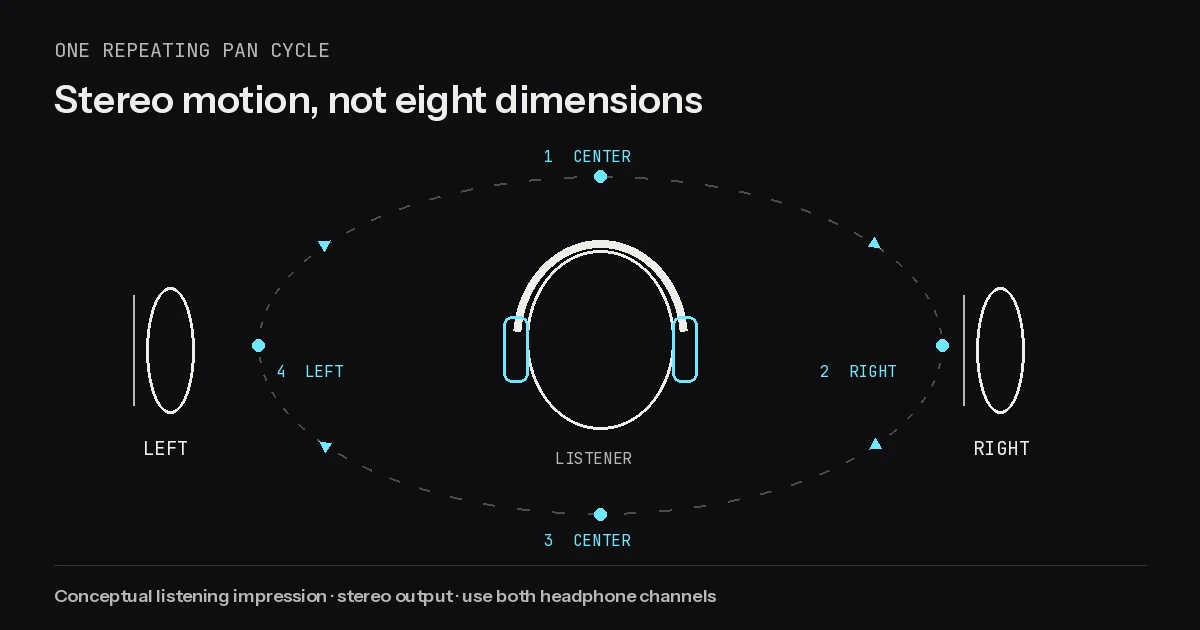
| Point in the repeating cycle | Position you are comparing |
|---|---|
| Start | Center |
| First side | Toward the right ear |
| Middle | Back through center |
| Other side | Toward the left ear |
| Repeat | Back through center |
This is a left/right cycle, not proof that the sound has physically traveled behind or above your head. The “orbit” in an 8D title is a description of the intended impression. Your impression may be a convincing sweep, or simply a recording moving between your ears.
Reverb adds a decaying layer around that moving signal. In the quick tool it is synthetic, with an amount slider; there are no individually selectable recorded rooms. At the default 25%, the moving signal and its reverberation are combined in a stereo output.
Distance is an impression, not a distance measurement in the interface. More ambience may make the original feel less close, but increasing the amount does not place an object at a specified number of meters. Audacity’s reverb manual is useful for separating the original dry signal from the reverberant wet signal.[3]
A practical consequence of summing the source to mono is that its original stereo placement is not preserved in the moving dry signal. If a wide original has an important guitar on one side and a response on the other, compare carefully before deciding that a whole-mix sweep improves it.
Why you need headphones
For this kind of stereo motion, headphones make the comparison easier because the two playback channels are delivered separately to your ears. Ordinary stereo headphones are enough for the Karps quick effect; there is no special “8D headphone” requirement.
Use both sides. With one earbud, you hear only part of the output and may interpret the movement as the song getting quieter and louder. If your device’s accessibility settings combine audio to mono, the directional cue can also be reduced or lost.
Stereo speakers can reproduce a left/right change too, but the result depends on their placement and your listening position. Both ears hear both speakers, so it is a different listening situation. A single phone speaker is not a useful test of whether the stereo motion was exported correctly.
If the movement feels distracting, slow the cycle down or stop playback. You do not need to “get used to” a strong setting for the effect to count. For an edited music video, compare the finished export through the same kind of listening setup you expect your audience to use.
Avoid stacking headphone enhancement modes while first judging the edit. Try the file with those extras off, then compare with your usual settings. That helps you hear the actual rendered effect instead of attributing everything your device does to the file.
8D vs 16D vs spatial audio (Dolby Atmos)
The numbers in online music-edit titles are not a reliable quality ladder. A file called “16D” is not automatically twice as spatial as one called “8D.” Ask what processing was actually done and what kind of file is delivered.
| Label or technique | What to look for | What not to assume |
|---|---|---|
| 8D edit | A described panning or spatial effect, often with reverb | Eight channels, height information or object metadata |
| 16D edit | The uploader’s explanation and an audible example | A universal upgrade over every 8D file |
| Stereo binaural render | A specific spatial rendering process for headphones | That every stereo pan effect uses that process |
| Dolby Atmos mix | An Atmos production and delivery workflow | That adding a pan effect to an MP3 creates Atmos |
“8D” and “16D” alone tell you less than settings such as “whole mix panned on a ten-second cycle.” Different creators can use the same title for different processing, including edits of separate parts when they have the material to do that. The name alone cannot establish which method they used.
Dolby’s Atmos Renderer documentation describes a system that works with audio beds, objects and positional metadata, then renders a mix for playback configurations.[15] That is a different workflow from repeatedly panning a finished song.
There is an important nuance: a headphone presentation can still be stereo. Two output channels do not by themselves tell you whether a file was made with simple panning or a more detailed spatial rendering process. Conversely, an MP3 that sounds spacious is not evidence that it is an Atmos master.
Karps’ quick output is the simple case: a rendered stereo music effect. It does not carry an Atmos object mix, and it does not follow your head when you turn. Choose it for the audible motion, not for a format label it cannot deliver.
Is 8D audio good for focus or sleep?
Treat focus, calm or sleep as personal listening goals, not promised results of the “8D” label. This guide does not establish that panning improves concentration, treats anxiety, changes brain function or helps a sleep condition. A music effect is not a medical intervention.
If you want background music for a task, compare a familiar section in its original form and with a slow sweep. Ask which version draws less attention away from the task. If your attention keeps following the moving vocal, the unedited recording may fit that situation better.
For winding down, use the same practical test: does the movement suit you, or do you prefer a stable image? You can like an 8D version for active listening and dislike it as background audio. Neither preference means the effect is broken.
Avoid treating a comment section as clinical evidence. A listener describing their own experience is not a guarantee that the same edit will produce that experience for you. Choose a comfortable volume and stop if you dislike the sensation.
Make your own 8D audio in three steps
- Open the 8D audio maker and choose a supported file you own or have permission to edit. The quick input limits are five minutes and 80 MB.
- Start with the default 10-second spin cycle and 25% reverb. Compare a vocal passage and a busy chorus through both sides of your headphones.
- Choose Download song and export MP3. Keep the file stereo when adding it to a video; a later mono export removes the left/right distinction.
The spin range is 4–20 seconds per repeating cycle. A larger seconds value means slower motion, not a faster spin. If the default is too obvious, try 16 seconds before reducing the number.
The browser 8D page does not also slow the track. For that separate style, see how to make slowed + reverb, or combine supported effects in Studio. A public upload still needs appropriate music rights; adding motion does not grant them.
For the exact controls, troubleshooting and a manual Audacity alternative, continue with how to make 8D audio. Start with a gentle cycle, compare the original, and keep the effect only if it adds something you actually want to hear.
Frequently asked questions
Is 8D audio actually eight-dimensional?
No. The label describes a spatial listening effect, not eight physical dimensions. Karps’ quick tool produces a stereo pan effect with optional synthetic reverb.
Do I need special headphones?
No. Ordinary stereo headphones work for this effect. Use both sides and check that your playback device is not combining the channels to mono.
Is 16D better than 8D?
The title alone cannot tell you. Compare the actual processing and sound rather than assuming a bigger number is a technical quality guarantee.
Is an 8D MP3 a Dolby Atmos file?
No. Panning a song and exporting stereo MP3 does not create an Atmos master with objects and positional metadata.
Does 8D audio improve sleep or focus?
This guide makes no clinical benefit claim. Whether the movement is pleasant or distracting depends on your preference and listening context.